Questions
I'm not great at listening in English, so if you have questions, feel free to send them as text too — it helps me give better answers. 英語のリスニングがあまり得意ではないので、ご質問はテキストでもいただけると、より的確にお答えできます。
Scan to send questions via text QRコードからテキストで質問を送れます
A new way to programmatically control Claude Code. No API costs. Full local environment access. We asked ourselves one question: Claude Codeをプログラムから制御する新しい方法。API費用ゼロ。ローカル環境へのフルアクセス。ひとつの問いが浮かんだ:
Joint Autonomous Adaptive Behavioral Intelligence Support Unit
A remote dashboard that orchestrates Claude Code across multiple projects — from any device, anywhere. 複数プロジェクトのClaude Codeを指揮するリモートダッシュボード — どのデバイスからでも、どこからでも。
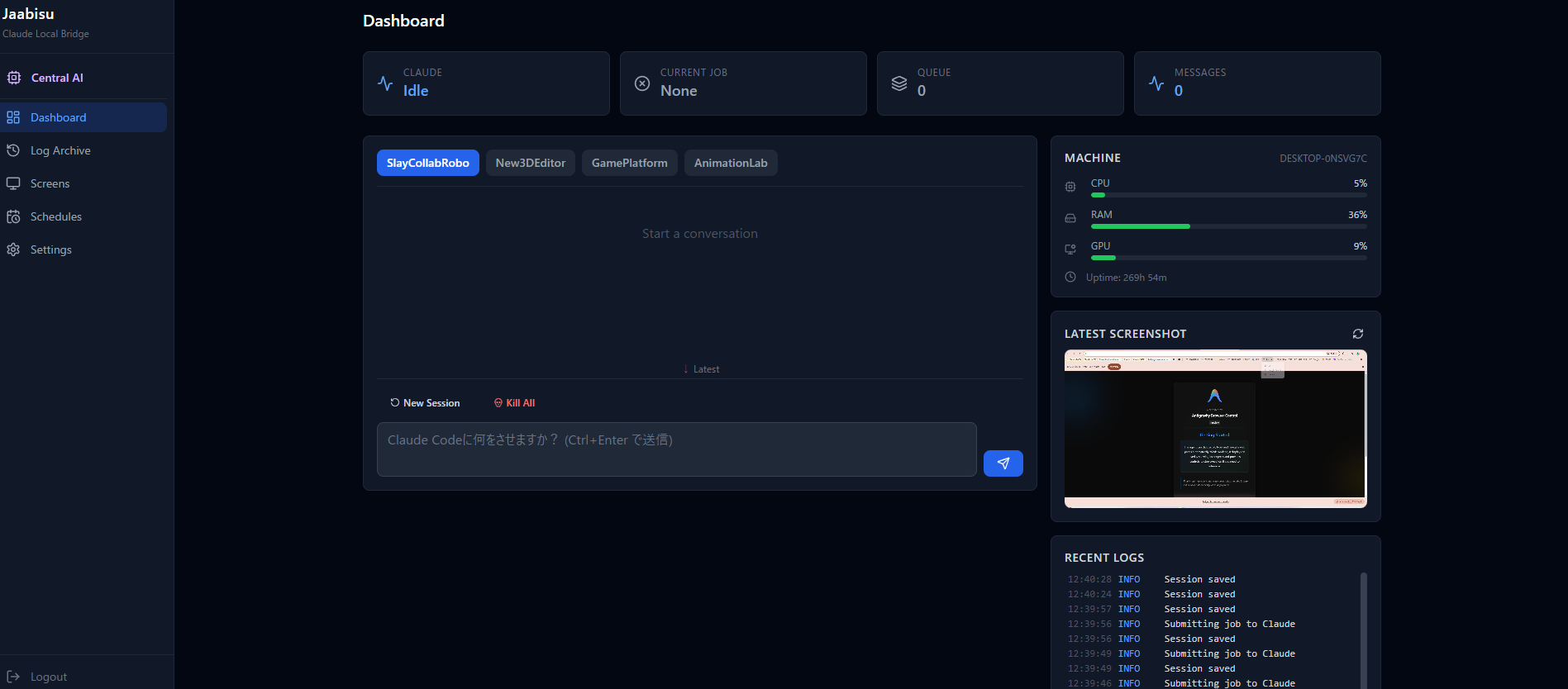
Claude's status, job queue, system metrics, live screenshots, and logs — all visible at a glance. Switch between projects instantly. Claudeの状態、ジョブキュー、システムメトリクス、ライブスクリーンショット、ログ — すべてが一目でわかる。プロジェクト間の切替も瞬時。
Central AI reads your profile, understands your TODO list, recalls past knowledge — then delegates tasks to the right project's Claude Code session. Central AIはプロフィールを読み、TODOリストを理解し、過去の知見を思い出し、適切なプロジェクトのClaude Codeセッションにタスクを委譲する。
Each project's tasks are tracked on the Mission Board. Central AI sends them to the right repo's Claude Code session for execution. 各プロジェクトのタスクをミッションボードで管理。Central AIが適切なリポジトリのClaude Codeセッションに送って実行させる。
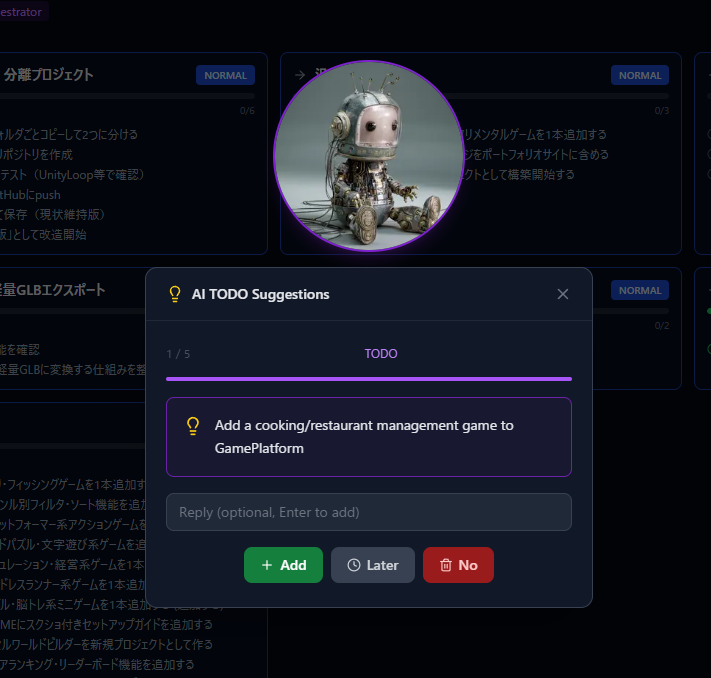
Claude analyzes your projects and suggests TODOs. 5 rapid-fire suggestions, voice input, animated avatar reactions. The feedback loop learns what you actually want. Claudeがプロジェクトを分析してTODOを提案。5つの速射提案、音声入力、アバターのリアクション。フィードバックループであなたの好みを学習。
Desktop screenshots captured every 10 seconds. See what apps are running, what browsers are open, what's actually happening — not just log output. デスクトップスクリーンショットを10秒ごとにキャプチャ。アプリの起動状況、ブラウザの表示内容、マシンで実際に何が起きているかを把握 — ログ出力だけでなく。
All sessions stored in SQLite. Browse by project, expand any session, review every prompt and response. Schedule execution results also land here. 全セッションをSQLiteに保存。プロジェクト別に閲覧、セッション展開、全プロンプトと応答をレビュー。スケジュール実行結果もここに記録。
Daily health checks. Weekly code reviews. Interval-based monitoring. One-time deployments. Claude jobs run on your schedule via native Windows Task Scheduler — no cron needed. 毎日のヘルスチェック。毎週のコードレビュー。一定間隔の監視。ワンタイムデプロイ。Windowsタスクスケジューラとネイティブ連携 — cronは不要。
Phone, laptop, tablet — any device in your Tailscale network. Encrypted, zero-config, no port forwarding. Your data never leaves your private network. スマホ、ノートPC、タブレット — Tailscaleネットワーク内のあらゆるデバイスから。暗号化、ゼロコンフィグ、ポート開放不要。データはプライベートネットワークの外に出ない。
We built a prototype with finger recognition — pinch to select, swipe to navigate, point to command. Like Iron Man's JARVIS interface. 指の認識でプロトタイプを構築 — ピンチで選択、スワイプでナビゲート、ポイントで指示。アイアンマンのJARVISインターフェースのように。
However, recognition accuracy over Tailscale remote connections wasn't reliable enough. This feature is on hold for now. ただし、Tailscale経由のリモート接続では認識精度が十分でなかった。この機能は現在保留中。
Subscription management ready.サブスクリプション管理を実装済み。
Private dev + public distribution maintained in parallel.プライベート開発版+公開配布版を並行メンテナンス。
Product site live, payment approval pending.販売サイト公開済み、決済承認待ち。
Iron Man-style gestures look cool, but recognition accuracy over remote connections is still an unsolved challenge.アイアンマン風ジェスチャーはカッコいいが、リモート越しの認識精度はまだ解決できていない。
AI executing tasks is becoming normal. The real value is when AI understands the project itself and generates the right TODOs automatically.AIがタスクをこなすのは当たり前になる。AIがプロジェクト自体を把握し、正しいTODOを自ら生成できることに本当の価値がある。
Gesture control, full autonomy — there's still a long way to go. This was a 48-hour experiment, not a finished product.ジェスチャー操作、完全な自律動作 — まだまだ先は長い。48時間の実験であり、完成品ではない。
A solid multi-project orchestration tool, built in 2 days. The fact that this is possible now is pretty amazing.まぁまぁしっかりしたマルチプロジェクトのオーケストレーションツールが2日で作れる。これが可能な時代になったのは素晴らしい。
J.A.A.B.I.S.U — Joint Autonomous Adaptive Behavioral Intelligence Support Unit